
Chase statements
Convert Chase Bank Statements to Excel & CSV
Tired of manually typing transaction data from Chase statements? Our AI transforms your PDFs into clean Excel or CSV files in seconds—no manual highlighting or complex setup.
No credit card required • 99% accuracy • Instant results
 PDF Statement
Why Chase Customers Choose Our AI Converter
Chase provides statements in PDF format, which works great for viewing but terrible for analysis. Copy-paste leads to broken columns, missing data, and hours of cleanup. Our converter handles the heavy lifting.
No Manual Table Selection Required
Older OCR tools ask you to highlight tables or guide the software. Our AI automatically detects and extracts every Chase transaction—just upload and relax.
Process Large Statements Instantly
Process a year of transactions or multiple accounts in one go. Even 200-page Chase statements convert in a single upload—perfect for tax season or audits.
Perfect Accuracy Every Time
We deliver 99% accuracy on Chase statement conversions. Dates, descriptions, amounts, and running balances stay intact—no manual corrections required.
Common Problems We Solve for Chase Users
1. Chase's Limited CSV Export
Chase only lets you export recent transactions via CSV. Historic data lives in PDFs. We turn those PDFs into the Excel or CSV files you actually need.
2. Manual Data Entry Nightmares
Typing hundreds of rows isn’t just tedious—it introduces costly errors. One decimal mistake can ruin a reconciliation. Let AI handle it.
3. Messy Copy-Paste Results
Copying from a Chase PDF into Excel jumbles columns, splits amounts, and breaks dates. Our converter outputs clean, ready-to-use spreadsheets.
4. Time-Consuming for Accountants
Managing multiple Chase accounts for clients eats up billable hours. Convert entire batches in minutes and focus on higher-value work.
How to Convert Your Chase Statement in 3 Steps
Upload Your Chase PDF Statement
Drag & drop your Chase statement. Works with password-protected files as well
AI Extracts data
We will automatically detect and extract all transactions, dates, amounts, credit/debit and balances.
Download Excel/CSV
Download your excel/csv file having clean columns (Date, Description, Debit/Credit, Amount) and your other bank details in separate sheet
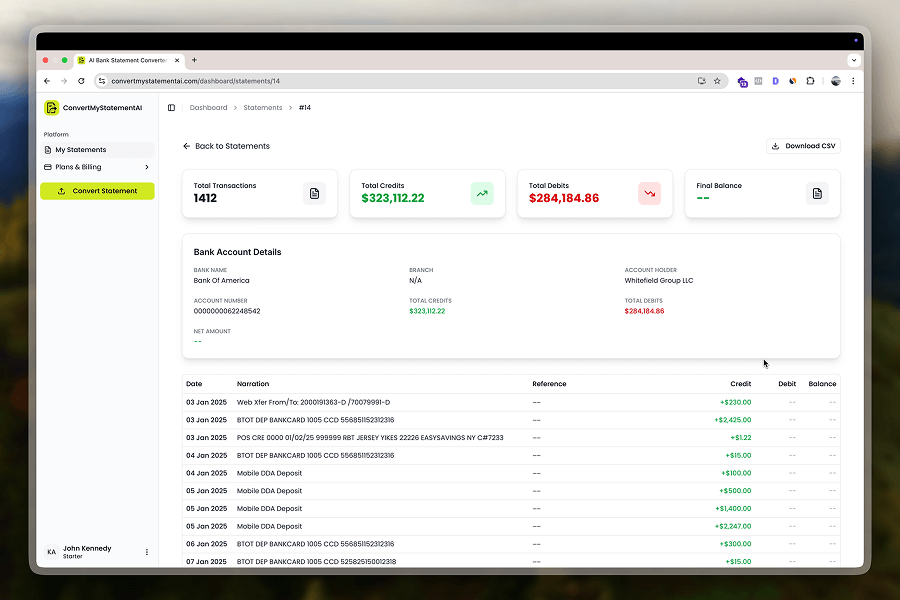
A Snapshot of how your data looks Post Conversion
After conversion, access organized Chase statements with transactions categorized, balances calculated, and ready for Excel or CSV export.
Accuracy Rate
Avg. Conversion Time
Pages / Upload
Smart Features Built for Chase Users
Automatic Transaction Categorization
We don’t just extract data—we categorize it automatically. Create custom rules for business vs. personal spend in seconds.
Works with All Chase Account Types
Personal checking, business accounts, savings, credit cards—we normalize every Chase statement layout.
Multiple Export Formats
Download Excel for analysis or CSV for QuickBooks, Xero, FreshBooks, or any accounting platform.
Bank-Level Security
Files are encrypted during upload and deleted automatically after conversion. We never store your financial data.
Ready to Convert Your Chase Statements?
Upload your statement. Get your Excel file. It's that simple.